
Compare the best online trading platforms in Canada

Summary

Thinking about DIY investing? This article lists popular online discount brokerages in Canada and helps you decide which brokerage and trading platform suits your needs by comparing key aspects and features in these sections:


If you're looking for the best trading platforms in Canada, you're not alone. A growing number of investors are switching to self-directed online brokerages and trading platforms. By empowering investors to manage their own portfolios, online brokerages have exploded in popularity.

Get started with TD EasyTrade™

Get started with TD Direct Investing

New and experienced investors are using self-directed online discount brokerages’ (also known as direct investing or discount brokerages) online trading platforms. Investors are empowered by their ability to buy and sell stocks, Exchange-Traded Funds (ETFs) and more, on their own, and to manage their own portfolios.

And there are other benefits, such as:

  • Increased to trading due to lower costs
  • mobile apps
  • ophisticated tools and resources
  • And more

Here’s a list of some of the most frequently used online discount brokerages in Canada, plus information about how to choose the one that’s right for you.

Popular discount brokerages in Canada

TD Direct investing online trading platforms

  • TD Easy TradeTM
  • WebB roker
  • Active Trader
  • Advanced D ashboard
  • TD Mobile App

Other popular Canadian discount brokerages

  • BMO
  • CIBC
  • Questrade
  • RBC
  • Scotia
  • Wealthsimple

Pick the online brokerage that aligns with your needs

Online brokerages let you trade a wide variety of investments, including stocks, Exchange-Traded Funds (ETFs), mutual funds, and more. Each platform has different featuresthat aligns with your needs and goals.

For example:

  • Are you a new investor with a smaller budget, looking for a way to dip your toe into trading and learn as you go?
  • Are you an experienced investor who needs sophisticated tools to manage a complex portfolio?
  • What types of assets and accounts do you want to invest in?
  • Do you want to trade at your desk or on the go?
  • What level of customer support do you need?

The following key attributes can help you compare:

  • Pricing
  • Education and support
  • Trading platform – the website or app where you invest
  • Account types offered
  • Investment types (securities) you can buy or sell
  • Market data and research tools

Use the tables below to compare online brokerages based on these attributes.

Pricing

Each online brokerage has its own pricing structure. For example, some require you to keep a minimum amount in your account and charge you if you fall below that amount. Others don’t. Some platforms:

  • Offer a certain number of free trades per year
  • Have flat fees
  • Offer lower-per share fees for high volume traders
  • Offer a tiered structure

Consider your budget and investment strategy as you go through the pricing section. For example, if you’re new to investing and want to try it out, or if you’d like to make small trades economically, you may want a platform with zero commission fees and the ability to buy partial shares. Compare your needs with the pricing structures listed in the table below.

(These platforms and brokerages are listed in no particular order.)

Online Trading Platform


Account min


Transaction Fees

Admin Fees (Registered Account)

Admin Fees (Non-Registered Account)


Inactivity Fee

TD Direct Investing online trading platforms:

*WebBroker

*Active Trader

*Advanced Dashboard

*TD Mobile App

  • $0
  • $9.99 flat fee per trade for stocks and ETFs for trades of 1 full share or more
  • $1.99 for trades less than 1 share (a partial share)
  • $0 - Select Exchange Traded Funds (ETFs)
  • Options – $9.99 + $1.25 per contract
  • Mutual Funds - $0 to buy or sell (but early redemption fees may apply)
  • Active trader pricing - $7 flat fee per online stock or ETF trade for clients with 150+ trades per quarter
  • $0

TD Easy TradeTM

  • $0
  • $0 commission on 100 trades a year, every year, in U.S. and Canadian stocks and ETFs, including partial shares
  • After 100 trades, pay $9.99 per trade on one full share or more, and $1.99 per trade for partial shares
  • $0
  • $0
  • $0

BMO

*InvestorLine Self-Directed

*InvestorLine adviceDirect

*SmartFolio

*Invest App

  • $0

Standard Trader

  • $9.95 flat fee per trade for stocks and Exchange Traded Funds (ETFs). $0 for eligible ETFs
  • Options – $9.95 + $1.25 per options contract
  • Mutual Funds - $0 (but early redemption fees may apply)
  • Active trader pricing - $3.95 flat fee per online stock or ETF trade for clients with 150+ trades per quarter
  • No TFSA-Tax-Free Savings Account fees
  • $50 Annual fee for RESP - Registered Education Savings Plan less than $25,000
  • $100 annual fee for all other registered accounts less than $25,000
  • $25 per quarter when account balance less than $15,000

$0

CIBC

*CIBC Investor’s Edge

*CIBC Mobile Wealth

  • $0
  • $6.95 flat fee per stock and ETF trade.
  • Options – flat fee + $1.25 per contract 
  • Money market mutual funds - $0
  • All other Mutual Funds - $6.95
  • Active investor pricing - $4.95 flat fee per online stock or ETF trade for clients with 150+ trades per quarter
  • No annual fee for TFSA - Tax- free savings account, FHSA-First Home Savings Account & RESP - Registered Education Savings Plan
  • Other registered accounts – $100 per year when account value less than $25,000
  • $100 per year when account balance less than $10,000 or if you also have a retirement account with CIBC
  •  $0

Questrade

*Questrade Trading

*QuestMobile

*Questrade Edge

*Questrade Edge Mobile

*Questrade Global

  • $0 but $1000 needed to start trading
  • Stocks - $0
  • ETFs – $0
  • Options - as low as $0 per contract for US Options
  • Mutual Funds – $ 9.95 per trade
  • No fee for registered accounts (TFSA-Tax- Free Savings Account, RRSP-Registered Retirement Savings Plan, RESP- Registered Education Savings Plan, RRIF-Registered Retirement Income Fund, FHSA-First-Home Savings Account
  • No fee
  • $0

RBC Direct Investing

*RBC Direct Investing Online

*Trading Dashboard

*RBC Mobile

*GoSmart

  • $0
  • 50 commission-free trades per year on stocks & ETFs (GoSmart)
  • Over 50 commission-free ETFs, including crypto, gold and silver ETFs
  • All other ETFs, less than 150 trades per quarter: $9.95 per online or mobile trade
  • Options – flat fee +$1.25 per contract

Commission-free Mutual Funds - Buy, sell and switch all mutual funds, commission-free

Stocks - less than 150 trades per quarter: $9.95 per online or mobile trade 150+ trades per quarter: $6.95 per online or mobile trade

Active trader pricing - $6.95 flat fee per online stock or ETF trade for clients with 150+ trades per quarter

  • $0
  • $25 per quarter where assets are less than $15,000 across all RBC Direct Investing accounts
  • $0

Scotia iTrade

*Scotia Online

*Trading Desk

*Trade Pro

*Scotia iTRADE App

  • $0
  • $9.99 flat fee per trade for stocks and ETFs
  • Options – flat fee + $1.25 per contract
  • Mutual Funds - $9.99 to buy/sell or switch orders
  • Active trader pricing - $4.99 flat fee per online stock or ETF trade for clients with 150+ trades per quarter
  • $1 per $1,000 Face Value ($24.00 minimum, $250 maximum) +$65 for trades placed by telephone reps
  • TFSA-Tax-Free Savings Account & FHSA - First-Home Savings Account – No fee
  • RESP - Registered Education Savings Plan, $25 per year if all accounts hold less than $15,000
  • RRSP - Registered Retirement Savings Plan, RRIF - Registered Retirement Income Fund, LIRA - Locked in Retirement Account,
  • LRSP - Locked-in Retirement Savings Plan, LIF - Life Income Fund - $100.00 per year if accounts hold less than $25,000 or fewer than 12 trades are placed per year
  • $25 account fee is charged if combined accounts add up to less than $15,000
  • $25 fee for investment accounts if you don’t make at least 1 trade per quarter

Wealthsimple

  • $0
  • Stocks - $0
  • ETFs - $0
  • Options - buy and sell options for $0
  • Crypto - starting as low as 0.05%
  • Gold - start for as little as $1
  • $0
  • $0
  • $0

Education and support

Access to education is crucial for investors who are just getting started. Online brokerages offer a range of education, from static learning through videos, articles, and webinars to interactive learning modules or live tutorials.

Similarly, customer support is critical for all self-directed investors and ranges from online FAQs and help centres to telephone support. Here’s what the online brokerage firms on our list offer.

(These platforms are listed in no particular order.)

TD Easy TradeTM

  • Videos
  • Articles
  • Webinars
  • TD Easy Trade Learning Lab (live online workshop) 
  • Telephone support
  • Online FAQs

Wealthsimple

  • Help Centre with Articles and Guides
  • Retirement calculator
  • Wealthsimple Magazine
  • Phone support
  • Chat
  • Email

BMO Investor Line

*InvestorLine Self-Directed

*InvestorLine adviceDirect

*SmartFolio

*Invest App

  • Articles
  • Video courses
  • Podcasts
  • Webinars
  • Financial calculators
  • Wealth management insights


  • Phone
  • Chat
  • Branch level support

CIBC Investor's Edge

*CIBC Investor’s Edge

*CIBC Mobile Wealth

  • Articles / guides
  • Videos & webinars
  • Education on Demand courses
  • Online help centre
  • Chat
  • Telephone support from licensed representatives
  • Online FAQs

QuesTrade

*Questrade Trading

*QuestMobile

*Questrade Edge

*Questrade Edge Mobile

*Questrade Global

  • Articles
  • Webinars
  • FAQs
  • Online help centre 
  • Phone
  • Chat
  • Email
  • Platform tutorials
  • In-person support

RBC Direct Investing

*RBC Direct Investing Online

*Trading Dashboard

*RBC Mobile

*GoSmart

  • Investing academy with articles and videos and demos
  • In-person seminars (in select cities)
  • Seminars
  • Practice accounts
  • Telephone support from licensed representatives
  • Email
  • In-person support
  • RBC Community online forum 
  • Platform tutorials

Scotia iTrade

*Scotia Online

*Trading Desk

*Trade Pro

*Scotia iTRADE App

  • How-to videos
  • Articles
  • Interactive learning modules
  • Telephone support from licensed representatives
  • Email
  • Online FAQs

Wealthsimple

  • Help Centre with articles, w ebinars and g uides
  • Calculators for tax, RRSP, TFSA, retirement, fees & international transfers
  • Wealthsimple Magazine
  • Newsletters
  • Phone support
  • Chat
  • Email
  • Online Help Centre

Trading platform: the website or app where you invest

A trading platform is the website or app you use to buy and sell investments, monitor your portfolio, and move money in and out of your account. For new investors especially, it should be easy to navigate and understand. A robust trading platform will give you the tools you need – to do research, build watchlists, set up alerts, get real-time data, make trades, and more – based on your experience or comfort level and investment goals.

Here’s a comparison of the trading platforms of the Canadian discount brokerages on our list:

(These platforms are listed in no particular order.)

Brokerage

Mobile App

Trading Platforms

Advanced Platform for active traders

TD Direct Investing online trading platforms:

*TD Mobile App

*WebBroker

*Advanced Dashboard

TD App lets you:

  • Place trades
  • Monitor performance
  • Access a customizable home screen
  • Access real-time snap quotes including company profiles, fundamentals, news and charts for stocks, mutual funds, ETFs, and option chains
  • Access the Learning Centre for education
  •  Set up price and volume alerts
  • Access watchlists

WebBroker lets you:

  • Access market & analyst research reports
  • Take advantage of technical analysis tools with charting, pattern recognition and alerts
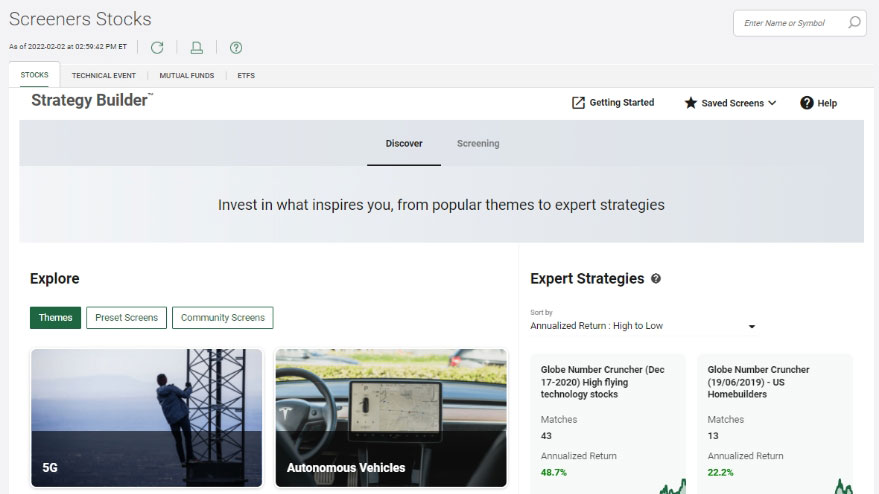
  • Create screeners
  • Access real-time level 1 market data
  • Access advanced order types
  • Buy/sell in one-click
  • Access the Learning Centre for education
  • Personalize your homepage
  • Review performance reports

Advanced Dashboard provides access to:

  • Equity Scanner
  • Heat maps
  • Trade finder
  • Advanced charting
  • Earnings Analyzer
  • Option chains
  • Advanced options
  • Analytics
  • Analyst evaluations
  • Streaming real-time level I and II market data

Active Trader, TD's most powerful platform best suited for active U.S. options traders enables access to:

  • One- to four-legged options strategies
  • Advanced order types such as bracket orders, First Triggers All, First Triggers Sequence, Limit and Market on Close, and more
  • More than 100 popular technical studies and advanced charting
  • 20 drawings, including eight Fibonacci tools
  • Earnings analyzer and company fundamentals tools
  • Practice account

TD Easy TradeTM

TD Easy TradeTM app lets you:
 

  • Trade in Canadian and U.S. stocks and ETFs, including partial shares
  • Access real-time, on-demand quotes and price alerts
  • Hold both Canadian and USD currency in your account
  • Set goals and track progress with a goal planning tool

BMO

*InvestorLine Self-Directed

*InvestorLine adviceDirect

*SmartFolio

*Invest App

The BMO Invest app lets you:

  • Place trades
  • Monitor account activity
  • Access quotes
  • Set up custom watchlists
  • Get real-time data
  • Make foreign exchange transactions 
  • Set up alerts

BMO Investorline lets you:

  • Place trades
  • Track performance
  • Research securities
  • Access analyst ratings, screeners and watchlists
  • Access trading tools such as value analyzer and technical insights 
  • Personalized insights
  • Value Analyzer
  • Environmental, Social and Governance (ESG) Insights

BMO Active Trader provides access to: 

  • Real-time streaming options chains, Greeks and strategies
  • Level 1 & 2 quotes
  • Global data and market research 
  • Order-entry tools, alerts, screeners, and customized watchlists
  • Advanced and customized charting

CIBC Investor's Edge

*CIBC Investor’s Edge

*CIBC Mobile Wealth

CIBC Mobile Wealth lets you:

  • Make trades
  • Access real-time snap quotes, advanced charts and watchlists
  • Track performance
  • Transfer funds
  • Review transactions
  • Make foreign exchange transactions 
  • Monitor investments
  • Access the Learning Centre for education
  • Access online documents (statements, confirmations, tax documents) 
  • Manage your accounts (update address, set up dividend reinvestment, link bank account, setup US markets trading, initiate transfers, withdraw from RRSP, change mailing options)

CIBC Investor's Edge lets you:

  • Make trades
  • Manage your accounts (update address, set up dividend reinvestment, link bank account, setup US markets trading, initiate transfers, withdraw from RRSP, change mailing options)
  • Check performance
  • Research securities using research tools, pre-defined screeners, sector and industry analysis
  • Access screening tools
  • Access technical analysis resources and advanced charting tools
  • Use advanced order entry types
  • Build personalized watchlists and alerts
  • Set up alerts
  • Make foreign exchange transactions
  • Access the Learning Centre for education
  • Access online documents (statements, confirmations, tax documents)

CIBC Investor's Edge provides access to:

  • Streaming real-time quotes
  • Market index data
  • BNN and Stock News
  • Market map
  • Market Activity (e.g. top gainers/losers)
  • Customized watchlists
  • Price and news alerts
  • Security information (corporate adjustments, time/sales & dividend information)
  • Advanced charting and technical analysis
  • Options summary, explorer and valuation

Questrade

*Questrade Trading

*QuestMobile

*Questrade Edge

*Questrade Edge Mobile

*Questrade Global

Quest Mobile lets you:

  • Make trades
  • Research securities
  • Move money
  • Monitor portfolio performance
  • Real-time snap quote
  • Access news, historical info and charting
  • Customizable instant alerts

Questrade Trading lets you:

  • Make trades
  • Manage your accounts
  • Monitor portfolio performance
  • Research stocks
  • Access basic charting, real-time quotes, instant notifications, watchlists, and research tools

Questrade Edge provides access to

  • Advanced order types
  • A customizable trading environment
  • Research tools from TipRanks, Trading Central, and Morning Star

RBC Direct Investing

*RBC Direct Investing Online

*Trading Dashboard

*RBC Mobile

*GoSmart

RBC Mobile App lets you:

  • Place trades
  • Look up stock quotes
  • Get level 2 quotes for TSX and TSX-V-listed securities
  • Monitor investments
  • Create & manage watchlists
  • Transfer funds in CAD and USD
  • Single sign-on access to RBC Rewards, RBC Wallet and RBC Dominion Securities

RBC Direct Investing lets you:

  • Make trades
  • Pre-market and after-hours trading and quotes
  • Access real-time streaming data with Level 2 quotes
  • Set up watchlists and alerts
  • Research securities using interactive tools, pre-defined screeners, sector and industry analysis
  • Access research from Morningstar technical analysis
  • Access advanced tools to visualize trends 

RBC Direct Investing's active trader program allows you to access:

  • Level 2 Quotes
  • Premium research from Morningstar and RBC Capital Markets.

Scotia iTrade

*Scotia Online

*Trading Desk

*Trade Pro

*Scotia iTRADE App

ITrade App lets you:

  • Create a watchlist
  • Place trades
  • Manage open orders
  • Transfer funds
  • Get real-time quotes, charts, news, and option chains
  • Access research and analysis
  • View demos


Scotia Online lets you:

  • Buy and sell Canadian and U.S. equities, ETFs, and options on major North American exchanges, as well as mutual funds, new issues, and fixed income 
  • Advanced research and market capabilities, including financial news, screeners, technical analysis, and other advanced tools
  • Access real-time stock alertsCreate Screeners
  • Create Screeners
  • View enhanced charting

Scotia iTrade’s Trade Pro provides access to:

  • An advanced, customizable platform
  • Real-time data on level 1 and level 2 assets
  • Research and news
  • Realtime streaming of quotes & option chains for US and Canadian securities
  • Symbol-based configurable option chains
  • Customizable charts
  • Customizable alerts

Wealthsimple

Wealthsimple Trade app lets you:

  • Place trades,
  • Access real-time, on-demand quotes and unlimited price alerts
  • Deposit up to $1,500
  • View trending stocks by different markets and categories

Wealthsimple trade lets you:

  • Place trades,
  • Access real-time, on-demand quotes and price alerts
  • Instant deposits of up to $50,000 for Core clients
  • View trending stocks by different markets and categories

Wealthsimple Trade Plus provides access to:

  • Real-time market data (snap quotes)
  • Access to no foreign exchange fees on USD trades
  • Unlimited price alerts
  • Deposit up to $250,000 instantly as a Premium or Generation client

Account types

Choose a platform with account types that are a good fit for your financial goals. Take your personal circumstances and goals into consideration. How much time do you have to invest? Are you looking for tax benefits? Accounts offered by online brokerage platforms may include:

Registered accounts

Registered accounts offer tax-efficient opportunities to help you achieve goals such as buying your first home, saving for retirement or education or other goals and include:

  • TFSA (Tax-Free Savings Account)
  • FHSA (First-Home Savings Account)
  • RRSP (Registered Retirement Savings Plan)
  • RESP (Registered Education Savings Plan)
  • RRIF- Registered Retirement Income Fun
  • RDSP - Registered Disability Savings Plan

Registered accounts have contribution limits. Check to see if you have contribution space.

Non-registered investment accounts

Non-registered investment accounts are useful for short and long-term goals and give you access to tax-efficient opportunities through income like dividends, interest, and capital gains. Non-registered U.S. dollar accounts also let you hold and earn interest on U.S. funds while reducing or avoiding foreign-exchange fees

Locked in accounts

  • Locked in accounts, such as a LIRA (Locked-in Retirement Account), heavily restrict withdrawals, which you can only make based on based on specific conditions

Corporate and non-personal accounts

  • Accounts typically used by businesses, corporations, and other legal entities, such as holding companies, trusts, and more

Here's a comparison of account types offered by the online brokerage firms on our list.

(These platforms are listed in no particular order.)

Brokerage

Registered accounts

Non- Registered accounts

Locked in

Corporate and non-personal

USD Accounts

TD Direct Investing online trading platforms:

*WebBroker

*Active Trader

*Advanced Dashboard

*TD Mobile App

  • TFSA - Tax- Free Savings Account
  • FHSA - First-Home Savings Plan
  • RRSP - Registered Retirement Savings Plan
  • RESP - Registered Education Savings Plan
  • RRIF- Registered Retirement Income Fun
  • RDSP - Registered Disability Savings Plan
  • Cash
  • Margin
  • LIRA
  • LIF
  • Yes
  • Yes

TD Easy TradeTM

  • TFSA - Tax- Free Savings Account 
  • FHSA - First-Home Savings Plan
  • RRSP - Registered Retirement Savings Plan
  • Cash
  • Yes

BMO

*InvestorLine Self-Directed

*InvestorLine adviceDirect

*SmartFolio

*Invest Ap

  • RRSP - Registered Retirement Savings Plan
  • TFSA - Tax- Free Savings Account 
  • FHSA - First- Home Savings Account 
  • RESP - Registered Education Savings Plan
  • RRIF - Registered Retirement Income Fund
  • Individual
  • Joint
  • Cash
  • Margin
  • LIRA - Locked-In Retirement Account 
  • RLSP - Restricted Locked-in Savings Plans
  • LRSP - Locked-In RSP
  • LRIF - Locked-In Retirement Income Fund
  • LIF - Life Income Fund
  • Trusts
  • Estates
  • Associations
  • Corporations
  • Investment clubs or partnerships 
  • Personal holding companies
  • No

CIBC

*CIBC Investor’s Edge

*CIBC Mobile Wealth

  • RRSP - Registered Retirement Savings Plan
  • TFSA - Tax- Free Savings Account
  • RESP - Registered Education Savings Plan
  • RRIF - Registered Retirement Income Fund
  • FHSA - First-Home Savings Plan
  • Cash
  • Margin
  • Corporate or Partnership
  • Investment Club
  • Formal Trust
  • Estate
  • Yes (except RESP)

Questrade

*Questrade Trading

*QuestMobile

*Questrade Edge

*Questrade Edge Mobile

*Questrade Global

  • RRSP - Registered Retirement Savings Plan (incl. Spousal and Locked-in RRSP)
  • TFSA - Tax- Free Savings Account 
  • RESP - Registered Education Savings Plan (incl. Family RESP)
  • RRIF - Registered Retirement Income Fund
  • FHSA - First-Home Savings Plan
  • Cash
  • Margin
  • LIRA - Locked-In Retirement Account 
  • LRSP - Locked-In RSP
  • LIF - Life Income Fund
  • Corporate
  • Partnership
  • Investment Club
  • Sole proprietorship
  • Individual or Joint Informal Trust 
  • Formal Trust
  • Individual or Joint foreign exchange and contracts for difference
  • Yes

RBC Direct Investing

*RBC Direct Investing Online

*Trading Dashboard

*RBC Mobile *GoSmart

  • RRSP - Registered Retirement Savings Plan
  • TFSA - Tax- Free Savings Account 
  • RESP - Registered Education Savings Plan
  • RRIF - Retirement Income Fund
  • FHSA - First-Home Savings Plan
  • Cash
  • Margin
  • LIRAs
  • RLSPs
  • LRIFs
  • LIF
  • Restricted Life Income Fund (RLIF)
  • Corporate
  • Sole Proprietor
  • Partnership
  • Limited Partnership
  • Estate
  • Formal Trust
  • Investment Club
  • Non-Profit Organization
  • Yes except RESP

Scotia iTrade

*Scotia Online

*Trading Desk

*Trade Pro

*Scotia iTRADE App

  • RRSP - Registered Retirement Savings Plan
  • TFSA - Tax- Free Savings Account
  • RESP - Registered Education Savings Plan
  • RRIF - Retirement Income Fund
  • FHSA - First-Home Savings Plan
  • U.S. dollar registered accounts
  • Cash
  • Margin
  • LIRA
  • LIF
  • Sole proprietorship
  • Corporate
  • Partnership
  • Unincorporated Organization (Charity or foundation)
  • Trust or Estate Account
  • All registered accounts support US dollar transactions except RESP

Wealthsimple

  • RRSP - Registered Retirement Savings Plan
  • TFSA - Tax- Free Savings Account 
  • FHSA - First-Home Savings Plan
  • Cash (Taxable account)
  • Margin
  • LIRA
  • RRIF
  • Corporate account (Invest for Business Account)
  • Offered only to Wealthsimple Premium and Generation clients

Investment types (securities) you can buy and sell

Securities are the investment types that you can buy and sell. A variety of investment types – including equities, such as stocks; debt securities, such as bonds; and derivatives, such as options – helps you manage risk and achieve consistent long-term returns. If you’re new to investing, just two investment types: stocks and ETFs , will give you a mix of accessibility, flexibility, diversification, and the potential for long-term growth.

Here are the securities you can trade in across our list of online brokerage firms.

(These platforms are listed in no particular order)

Online Trading Platform

Investment Types (Securities)

TD Direct Investing online trading platforms:

*WebBroker

*Active Trader

*Advanced Dashboard

*TD Mobile App

  • Stocks
  • Options
  • Mutual funds
  • ETFs
  • GICs
  • Bonds
  • New issues
  • Structured notes

TD Easy Trade

  • Stocks
  • ETFs

BMO Investor Line

*InvestorLine Self-Directed

*InvestorLine adviceDirect

*SmartFolio

*Invest App

  • Stocks
  • CDRs
  • GICs
  • Bonds
  • Options,
  • Mutual funds
  • ETFs

CIBC

*CIBC Investor’s Edge

*CIBC Mobile Wealth

  • Stocks
  • CDRs 
  • GICs
  • Fixed income 
  • Options
  • Mutual funds
  • ETFs
  • Structured notes
  • IPOs
  • Precious metals

Questrade

*Questrade Trading

*QuestMobile

*Questrade Edge

*Questrade Edge Mobile

*Questrade Global

  • Stocks
  • GICs
  • Fixed income
  • Options
  • Mutual funds
  • Foreign exchange
  • ETFs
  • IPOs
  • Bonds
  • International equities 
  • Precious metals
  • Contract for Differences (CFD)

RBC Direct Investing

*RBC Direct Investing Online

*Trading Dashboard

*RBC Mobile

*GoSmart

  • Stocks
  • Options
  • Mutual funds
  • ETFs
  • GICs
  • Bonds
  • IPOs
  • Gold and Silver Certificates

Scotia iTrade

*Scotia Online

*Trading Desk

*Trade Pro

*Scotia iTRADE App

  • Stocks
  • Options
  • Mutual funds
  • ETFs
  • GICs 
  • Bonds
  • New issues

Wealthsimple

  • Stocks
  • ETFs
  • Crypto
  • Options
  • Gold
  • Direct Indexing

Market data and research tools

Before you make an investment in a stock or ETF, you need to understand whether its profile and performance align with your goals. Access to reliable data can help you make informed decisions and contribute to your investments’ growth over the long term. Market data comes in a range of forms, from real-time data and quotes to research reports to analyst ratings, and more. If you’re new to investing, fundamental company data like revenue, debt levels and competitive advantages is very helpful. So are basic market performance metrics and an understanding of broad economic indicators such as interest rates and industry trends.

Research tools such as watchlists, charting tools, and performance reporting can help you track and screen the companies you’re interested in. If you’re a new investor, p lanning and watchlist tools, as well as educational resources to help build your financial literacy and confidence, may also be helpful .

Here are some of the research reports and tools offered by the brokerages on our list:

(These platforms are listed in no particular order.)

OnlineTrading Platform

Research report

Tools

TD Direct Investing

*WebBroker

*Active Trader

*Advanced Dashboard

*TD Mobile App

  • Analyst Centre provides research reports and analyst ratings
  • Real-time market data 
  • Goal Planning
  • Technical analysis tools (Screeners, custom watchlists, Alerts)
  • Charting tools
  • Performance reporting
  • Robust library of on-demand videos

TD Easy TradeTM

  • Real-time quotes
  • Real-time market data and reports 
  • Analyst rating
  • ESG insights
  • Goal planning
  • Custom watchlists
  • Trending stocks alerts
  • Built-in educational videos and resources
  • Basic charting tools
  • Screeners

BMO Investor Line

*InvestorLine Self-Directed

*InvestorLine adviceDirect

*SmartFolio

*Invest Ap

  • Real-time market data and reports 
  • Analyst rating 
  • ESG insights
  • Screeners
  • Custom watchlists
  • Alerts
  • Value analyzer
  • Technical analysis tool

CIBC

*CIBC Investor’s Edge

*CIBC Mobile Wealth

  • Research reports
  • Real-time market data
  • Analyst ratings
  • Watchlists
  • Advanced charting tools
  • Technical analysis resources
  • Screeners
  • Alerts

Questrade

*Questrade Trading

*QuestMobile

*Questrade Edge

*Questrade Edge Mobile

*Questrade Global

  • Real-time market data and research reports
  • Additional cost for enhanced (advanced) market data packages that includes live streaming, real-time data
  • Goal Tracking
  • Watchlists
  • Smart alerts
  • Events calendar
  • Charting tools
  • Screeners
  • Portfolio score & simulator

RBC Direct Investing

*RBC Direct Investing Online

*Trading Dashboard

*RBC Mobile

*GoSmart

  • Real-time streaming quotes
  • Research reports
  • Practice account
  • Watchlists
  • Events calendar
  • Screeners
  • Sector & industry analysis
  • Technical analysis
  • Advanced charting tools

Scotia iTrade

*Scotia Online

*Trading Desk

*Trade Pro

*Scotia iTRADE App

  • Analyst research centre provides research reports and stock ratings
  • Real-time market data
  • Goal Planning
  • Technical analysis tools (Screeners, watchlists, Alerts)
  • Sustainable investing tools
  • Account management tools 

Wealthsimple

  • Real-time quotes
  • Real-time charting
  • Price alerts
  • Basic charting tools
  • Watchlists
  • Screeners
  • Exportable holdings

Online trading platform FAQs

How do I decide which online investing app or website to use?

Do you want to invest at your desk or on the go from wherever you are? If you want access anytime, an app might be best for you. App, desktop, or combination (some firms offer both) – it should be easy to navigate and understand. If you’re considering an app, things to look for might include:

  • Simple design
  • In-app help and learning resources to help add to your knowledge and build confidence
  • Information that’s there when you need it to help with a specific step or action

Desktop or app, it may be helpful if there’s customer support and learning resources at hand for when you need help navigating or using specific features.


What type of educational/market research should I look for in an online investing app or website?

Online investing apps and websites offer a range of learning resources. New investors may benefit from step-by-step , along with videos, articles, and webinars.

For seasoned investors, tools such as advanced charting and earnings analyzers can be incredibly valuable. However, for novice investors, they may feel overwhelming and add extra complexity. So, if you are a beginner, you might want to consider simple tools that will help you learn and make decisions, such as watchlists to track your favourite stocks, real-time quotes and price alerts to help you make decisions, and a goal planning tool to set goals and track your progress.


How do I decide which accounts to open? What should I consider?

It’s a good idea to invest in accounts that support your life and financial goals. You might also consider the amount of time you have to invest (your time horizon). For example, are you saving for a trip or building an emergency fund? Are you making a long or short-term investment? Here are some of the core registered accounts you might want to consider, plus an unregistered cash trading account:

  • TFSA – Tax-Free Savings Account, great for saving for a trip or building an emergency fund
  • FHSA – First-Home Savings Account, great for first-time home buyers
  • RRSP – Registered Retirement Savings Plan, to help you prepare for retirement
  • Cash trading account – ideal for when you have filled up your contribution room or want flexible access

The information contained herein has been provided by TD Direct Investing and is for information purposes only. The information has been drawn from sources believed to be reliable and last updated in January 2026. 

The information contained herein has been provided by TD Direct Investing and is for information purposes only. The information has been drawn from sources believed to be reliable. The information does not provide financial, legal, tax or investment advice. Particular investment, tax, or trading strategies should be evaluated relative to each individual's objectives and risk tolerance. The information contained herein is current as of March 2nd, 2026.

TD Easy Trade™ is a service of TD Direct Investing, a division of TD Waterhouse Canada Inc., a subsidiary of The Toronto-Dominion Bank.

TD Direct Investing is a division of TD Waterhouse Canada Inc., a subsidiary of The Toronto-Dominion Bank.


Share this article

Related articles
View our learning centre to see how we're ready to help

Invest with us – Choose your option

  • Trade your way, right away. Invest in stocks and ETFs on this easy-to-use mobile app. 100 free trades a year, no minimums, no account fees.

  • Invest confidently with user-friendly platforms, innovative tools, support, and learning resources designed for every level of your investing journey.

Need help choosing a DIY investing service? Compare platforms

Have a question? Find answers here